LISP Utilities
ZZZZZZZ.ELFQuick Layer Freeze and Unfreeze
Freezes and thaws layers identified by "DIM".
Description
This tool provides a shortcut to quickly manage the visibility of dimension layers.
- ZZ
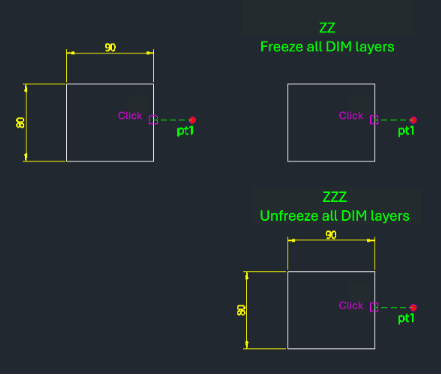
- Instantly freezes all layers whose names start with "DIM" (e.g., DIM, DIM1, DIM_TEXT). This is useful for quickly hiding dimensions to clear up the drawing view.
- ZZZ
- Instantly unfreezes (thaws) all layers starting with "DIM", restoring their visibility.
- Target Layers
- Specifically targets layers with the "DIM" prefix.
How to use
To Freeze Dimensions:
All layers starting with "DIM" are frozen.
To Unfreeze Dimensions:
All layers starting with "DIM" are unfrozen (thawed).
- 1.Type zz in the command line and press Enter.
- 2.Type zzz in the command line and press Enter.
Example
Included free
All 401 LISP utilities come free with every Cadopilar license.
Purchase any Cadopilar license and our team will install the complete suite for you. No additional charge, no setup headaches.
Contact us to get started →