LISP Utilities
STDSTD.ELFStretch Distance (Simple Rectangle Stretch)
Stretches a rectangle by a specified value.
Description
This tool allows you to easily stretch a rectangular object by a specific distance without manually specifying base points and displacement vectors.
- Simplified Stretching
- Streamlines the stretch command for simple, orthogonal rectangular shapes.
- Directional Stretch
- You input the distance, select the object, and then pick a direction to stretch.
- Input
- Requires the stretch distance, selecting the object to stretch, and a direction point.
How to use
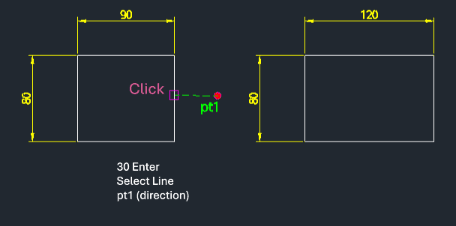
The selected portion of the rectangle is stretched by the specified distance in the chosen direction.
- 1.Type std in the command line and press Enter.
- 2.Enter the Stretch Distance and press Enter.
- 3.Select the Object (the part of the rectangle you want to stretch) using a crossing selection.
- 4.Click a Direction Point to indicate which way to stretch.
Example
Included free
All 401 LISP utilities come free with every Cadopilar license.
Purchase any Cadopilar license and our team will install the complete suite for you. No additional charge, no setup headaches.
Contact us to get started →