LISP Utilities
PMOVE2PMOVE2.elfOrthogonal Point Projection to Polyline
Moves points to a polyline perpendicularly.
Description
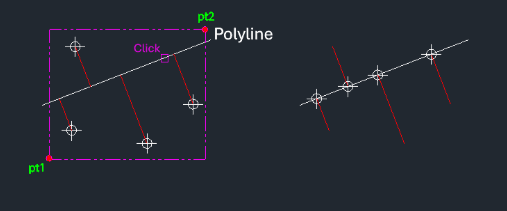
This tool moves selected point objects perpendicularly onto a selected polyline.
- Orthogonal Projection
- Similar to PMOVE, but instead of moving vertically, points are moved along the shortest path (perpendicular/orthogonal) to intersect the target polyline.
- Geometry Alignment
- Useful for snapping survey points or layout markers directly onto a path or boundary line.
- Batch Processing
- Handles multiple points in one operation.
- Input
- Requires selecting the point objects first, then the target polyline.
How to use
The points are moved perpendicularly to intersect the polyline.
- 1.Type pmove2 in the command line and press Enter.
- 2.Select the Point Objects using a selection window and press Enter.
- 3.Select the Target Polyline.
Example
Included free
All 401 LISP utilities come free with every Cadopilar license.
Purchase any Cadopilar license and our team will install the complete suite for you. No additional charge, no setup headaches.
Contact us to get started →