LISP Utilities
PMOVEPMOVE.elfProject Points Vertically to Polyline
Moves points to a polyline vertically.
Description
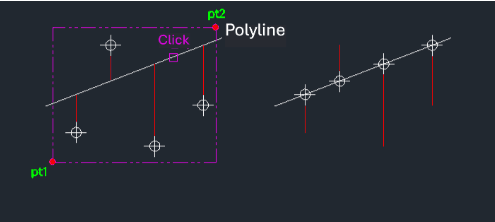
This tool moves selected point objects vertically (along the Y-axis) until they intersect with a selected polyline.
- Vertical Projection
- Ideal for projecting points onto a profile or cross-section line.
- Batch Operation
- Can process multiple point objects at once.
- Constraint
- Points are moved strictly along the Y-axis to meet the polyline.
- Input
- Requires selecting the point objects first, then the target polyline.
How to use
The points are moved vertically to intersect the polyline.
- 1.Type pmove in the command line and press Enter.
- 2.Select the Point Objects using a selection window and press Enter.
- 3.Select the Target Polyline.
Example
Included free
All 401 LISP utilities come free with every Cadopilar license.
Purchase any Cadopilar license and our team will install the complete suite for you. No additional charge, no setup headaches.
Contact us to get started →