Description
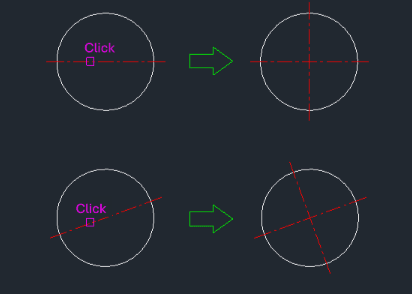
This tool creates a copy of a selected line and rotates it by 90 degrees around a specific point.
- Rapid Creation
- Quickly generate perpendicular lines from an existing line.
- Rotate & Copy
- Combines the copy and rotate commands into a single action with a fixed 90-degree angle.
- Input
- Requires selecting a single line object.
How to use
A copy of the selected line is created, rotated 90 degrees relative to the original.
- 1.Type a90 in the command line and press Enter.
- 2.Click on the Line you want to copy and rotate.
Note
- The pivot point for rotation is likely the point where you clicked on the line or one of its endpoints, depending on the specific LISP implementation (which isn't fully detailed in the summary but implied by "click a line").
Example
Included free
All 401 LISP utilities come free with every Cadopilar license.
Purchase any Cadopilar license and our team will install the complete suite for you. No additional charge, no setup headaches.
Contact us to get started →