LISP Utilities
MINTMint.elfMove Object to Intersection Point
Moves an object to a specified intersection.
Description
This tool facilitates moving a selected object to a precise intersection point created by temporary geometry.
- Complex Positioning
- Useful when you need to move an object to a location defined by the intersection of existing geometry and a temporary projection or line.
- Temporary Construction
- It creates a temporary line from a reference point to define an intersection, moves the object, and then automatically deletes the temporary line.
- Input
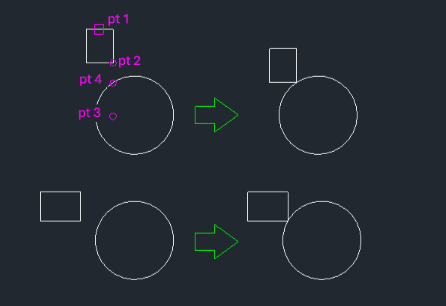
- Requires selecting the object to move, a base point on the object, a second point to define a temporary line (creating an intersection with another object), and finally the intersection point itself as the destination.
How to use
The object is moved to that intersection point, and the temporary line is removed.
- 1.Type mint in the command line and press Enter.
- 2.Select the Object to move.
- 3.Click the Base Point (2) on the object.
- 4.Click a Second Point (3) to draw a temporary line that intersects with another existing object (e.g., a circle).
- 5.Click the Intersection Point (4) created by the temporary line and the existing object.
Example
Included free
All 401 LISP utilities come free with every Cadopilar license.
Purchase any Cadopilar license and our team will install the complete suite for you. No additional charge, no setup headaches.
Contact us to get started →