LISP Utilities
MIDMID.elfDraw Center Line between Two Lines
Generates a bisecting centerline between two lines.
Description
This tool draws a horizontal center line precisely between two selected lines (or polylines).
- Automated Midpoint
- Calculates the midpoint between two vertical or near-vertical lines to draw a horizontal bisector.
- Auto-Layer
- Automatically places the line on the CENTER layer.
- Compatibility
- Works with both standard lines and polylines.
- Input
- Requires selecting two line objects sequentially.
How to use
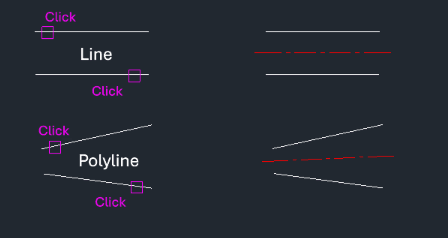
A center line is automatically drawn horizontally between the two lines on the CENTER layer.
- 1.Type mid in the command line and press Enter.
- 2.Click the First Line.
- 3.Click the Second Line.
Note
- This specific LISP might not include the layer creation routine itself, so it's recommended to use it within an environment where the CENTER layer exists or use a comprehensive LISP package that handles layer creation.
Example
Included free
All 401 LISP utilities come free with every Cadopilar license.
Purchase any Cadopilar license and our team will install the complete suite for you. No additional charge, no setup headaches.
Contact us to get started →