LISP Utilities
DTODIMDTOIM.ELFMove Dimensions to DIM Layer
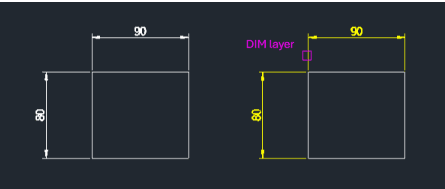
Reassigns dimension objects to the DIM layer.
Description
This tool automatically moves all dimension objects in the drawing to a specific layer named "DIM".
- Layer Organization
- Quickly standardizes drawings by placing all dimensions on a dedicated layer.
- Auto-Layer Creation
- If the "DIM" layer does not exist, it is created automatically.
- Default Color
- The "DIM" layer is set to color 2 (yellow) by default if created.
- Batch Process
- Affects all dimension objects in the current drawing space.
How to use
All dimension objects are immediately moved to the DIM layer.
If the layer didn't exist, it's created with color 2.
- 1.Type dtodim in the command line and press Enter.
Example
Included free
All 401 LISP utilities come free with every Cadopilar license.
Purchase any Cadopilar license and our team will install the complete suite for you. No additional charge, no setup headaches.
Contact us to get started →