LISP Utilities
XYEXTxyext.elfExtract Coords (Interval)
Extracts coordinates from Line, Polyline, Arc and Spline at specified intervals.
Description
This tool extracts XY Coordinates from a selected line or curve at specified intervals.
- Versatility
- Works on Lines, Polylines, Arcs, and Splines.
- Civil Engineering Utility
- Particularly useful in civil engineering or surveying when you need to generate a list of coordinates along a path (e.g., a road alignment or contour) at regular steps.
- Export Ready
- The output is displayed in the text window, making it easy to copy and paste into Excel.
How to use
The tool calculates the coordinates starting from the beginning of the object at the specified interval.
- 1.Type XYEXT in the command line and press Enter.
- 2.Select the Object (Line, Pline, Arc, or Spline) you want to analyze.
- 3.Enter the desired Interval Distance (e.g., every 10 meters).
- To Save Data
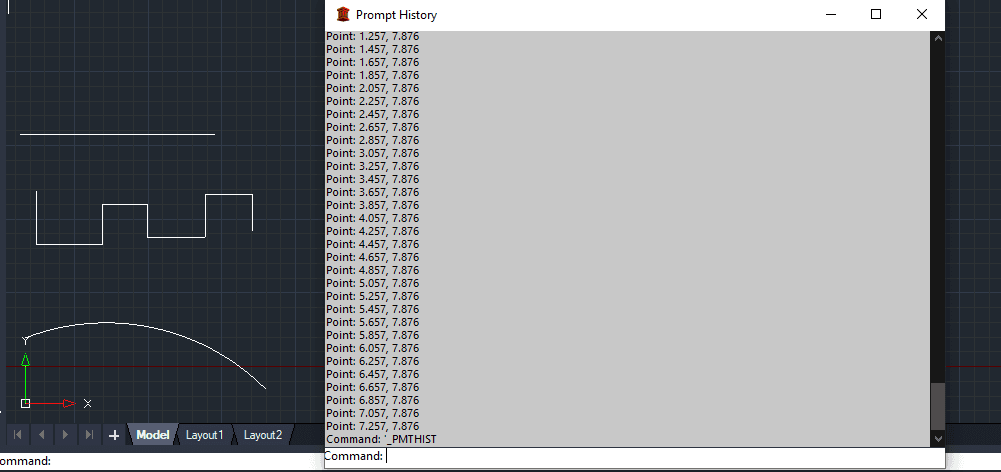
- Press F2 to open the Text Window, select the coordinate list, press Ctrl+C to copy, and paste it into Excel or a text editor.
Example
Included free
All 401 LISP utilities come free with every Cadopilar license.
Purchase any Cadopilar license and our team will install the complete suite for you. No additional charge, no setup headaches.
Contact us to get started →