LISP Utilities
EARCearc.elfCap 2 Lines with Arc
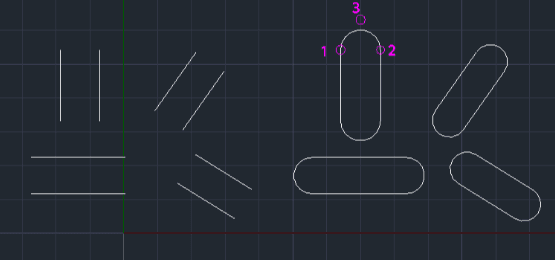
Generates a closing arc segment between the endpoints of two selected lines
Description
This tool allows you to easily draw an arc connecting the endpoints of two existing lines.
- Usage Context
- It is particularly useful for creating rounded connections after copying or offsetting horizontal, vertical, or inclined lines.
How to use
- 1.Type earc in the command line and press Enter.
- 2.Click the endpoint of the first line.
- 3.Click the endpoint of the second line.
- 4.Click a point to define the direction where the arc should be drawn.
Example
Included free
All 401 LISP utilities come free with every Cadopilar license.
Purchase any Cadopilar license and our team will install the complete suite for you. No additional charge, no setup headaches.
Contact us to get started →