LISP Utilities
WW / EEww.elfTrim at Intersection / Extend to Corner
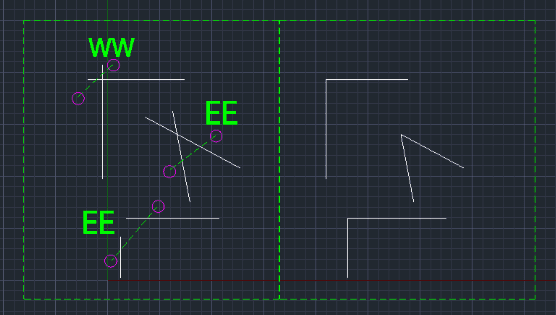
(WW)Trims two lines at their intersection / (EE) Extends two lines to meet at a corner
Description
This tool provides two ergonomic shortcuts for common line editing operations: Trimming and Corner Connection.
- WW (Easy Trim)
- Quickly trims lines by simply selecting the area where two lines intersect/cross.
- EE (Corner Connect)
- Connects two separated lines to form a sharp corner (acting like a Fillet with Radius 0). Supports Polylines (v1.1).
How to use
Perform a crossing selection (click two points) over the two lines you want to modify.
The lines are automatically trimmed or extended to meet at a corner.
- 1.Type ww (to trim) or ee (to connect) in the command line and press Enter.
Example
Included free
All 401 LISP utilities come free with every Cadopilar license.
Purchase any Cadopilar license and our team will install the complete suite for you. No additional charge, no setup headaches.
Contact us to get started →