LISP Utilities
ST2st2.elfQuick Stretch
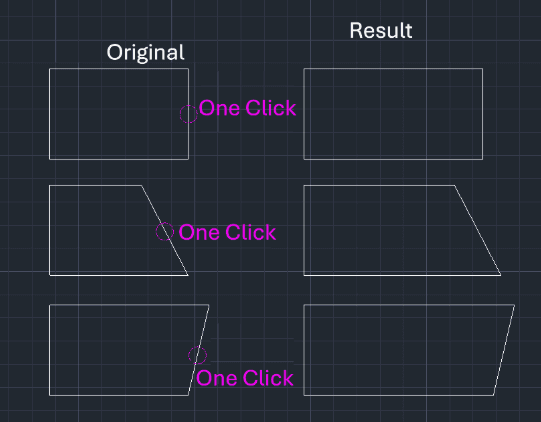
Enhanced Stretch. Extends a single side of a rectangle with a single click
Description
This tool is a "revolutionary" improvement over the standard STRETCH command, designed to extend a rectangle's side or a line with minimal clicks.
- Efficiency
- Standard STRETCH often requires up to 7 clicks (Command > Cross Select > Enter > Base Point > Target Point). ST2 reduces this to just 2 clicks or inputs.
- Polyline Handling
- If applied to a Polyline, the tool will automatically explode it first; you simply re-select the line to extend it.
How to use
Move your mouse in the desired direction and Click a point on the screen.
OR move your mouse in the direction, type the Distance Value, and press Enter.
The line (or side) is extended immediately.
- 1.Type ST2 in the command line and press Enter.
- 2.Select the Line (side of the rectangle) you want to extend.
- 3.Specify the Direction and Distance:
Example
Included free
All 401 LISP utilities come free with every Cadopilar license.
Purchase any Cadopilar license and our team will install the complete suite for you. No additional charge, no setup headaches.
Contact us to get started →