LISP Utilities
1EX1ex.elfSymmetric Trim (10%)
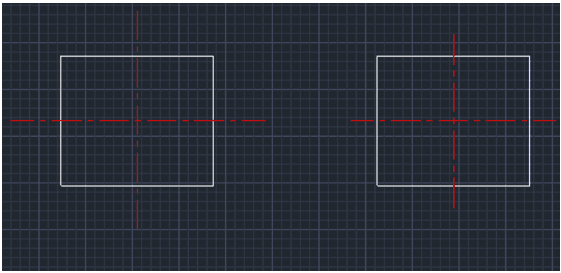
Trims the object length symmetrically from both ends by 10%.
Description
This tool automatically shortens lines by 10% from both ends.
- Batch Processing
- You can select multiple objects at once; the tool will filter out only the Line objects and apply the modification.
- Use Case
- Particularly useful for adjusting centerlines that were drawn too long and need to be shortened neatly without manual trimming.
How to use
All selected lines are immediately shortened by 10% from both ends.
- 1.Type 1EX in the command line and press Enter.
- 2.Select the Objects you want to modify (you can select a mix of objects; only lines will be affected).
- 3.Press Enter.
Example
Included free
All 401 LISP utilities come free with every Cadopilar license.
Purchase any Cadopilar license and our team will install the complete suite for you. No additional charge, no setup headaches.
Contact us to get started →