Description
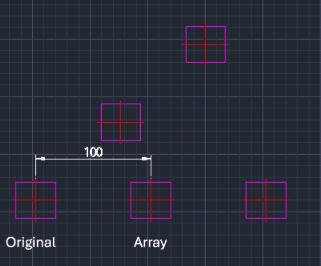
This tool allows you to perform a Linear Array (Copy) of objects in any direction.
- Flexible Direction
- Unlike standard arrays that might be restricted to X/Y axes or require specific settings, this tool lets you define the array direction simply by clicking points on the screen.
- Quick Linear Copy
- Easily create a single row of copies spaced at a specific interval in any chosen direction.
How to use
The objects are arrayed in a single line along the specified direction.
- 1.Type AAR in the command line and press Enter.
- 2.Select the Objects to array and press Enter.
- 3.Click a Base Point on the screen.
- 4.Click a Direction Point to define the angle/direction of the array.
- 5.Enter the Distance (Interval) between objects.
- 6.Enter the Total Quantity of objects.
Example
Included free
All 401 LISP utilities come free with every Cadopilar license.
Purchase any Cadopilar license and our team will install the complete suite for you. No additional charge, no setup headaches.
Contact us to get started →