LISP Utilities
XBOXxbox.elfDraw Rect with X
Draws a crossed-box via freehand selection or dimension input.
Description
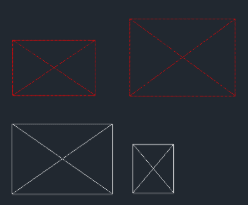
This tool draws a rectangle with an X-Cross (diagonal lines) inside it in a single step.
- All-in-One
- Combines drawing the boundary box and the diagonal cross lines into one command.
- Flexible Input
- Offers two methods for defining the box dimensions (Two Points or Dimensions).
- Layer Aware
- Objects are created on the Current Layer.
How to use
The rectangle and the X-cross are generated immediately.
- 1.Type XBOX in the command line and press Enter.
- 2.Choose a drawing method :
- Option 1 (Two Points)
- Click the start corner and the opposite corner.
- Option 2 (Dimensions)
- Click the bottom-left start point, then input (or click to define) the Width and Height.
Example
Included free
All 401 LISP utilities come free with every Cadopilar license.
Purchase any Cadopilar license and our team will install the complete suite for you. No additional charge, no setup headaches.
Contact us to get started →