LISP Utilities
RCTrct.elfDraw Rect. Centerline
Generates centerlines for a selected rectangular object.
Description
This tool instantly generates centerlines for rectangular shapes (e.g., shafts, architectural columns).
- Versatile Selection
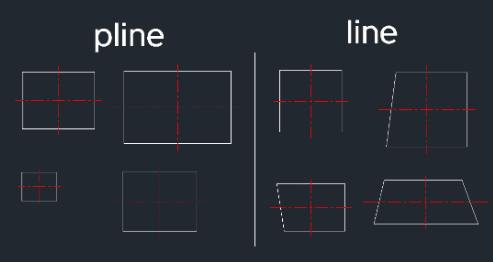
- Works regardless of whether the rectangle is drawn with Polyline or individual Lines.
- Auto-Calculation
- Calculates the geometric center based on the two diagonal corner points you select.
- Auto-Layering
- Automatically creates and uses the CENTER layer.
How to use
The tool automatically draws the cross-hair centerlines for that area.
- 1.Type RCT in the command line and press Enter.
- 2.Click the Bottom-Left corner of the rectangular area.
- 3.Click the Top-Right corner of the rectangular area.
Example
Included free
All 401 LISP utilities come free with every Cadopilar license.
Purchase any Cadopilar license and our team will install the complete suite for you. No additional charge, no setup headaches.
Contact us to get started →