LISP Utilities
4C4c.elfDraw 4-Hole Bolt Pattern
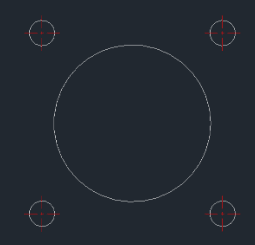
Generates a 4-hole bolt pattern and centerlines around an existing base circle. (Includes automatic layer creation.)
Description
This tool automatically creates a pattern of 4 small circles (e.g., bolt holes) around a center point, complete with centerlines.
- Instant Pattern
- Draws four evenly spaced circles around a central origin in one go.
- Auto-Centerlines
- Automatically generates the necessary centerlines for the pattern.
How to use
The 4 circles and their centerlines are drawn immediately.
- 1.Type 4C in the command line and press Enter.
- 2.Specify the Center Point of the main (central) circle.
- 3.Enter the Radius for the Pattern (distance from the main center to the center of the small circles / Bolt Circle Radius).
- 4.Enter the Radius of the Small Circles (hole size).
Example
Included free
All 401 LISP utilities come free with every Cadopilar license.
Purchase any Cadopilar license and our team will install the complete suite for you. No additional charge, no setup headaches.
Contact us to get started →