Description
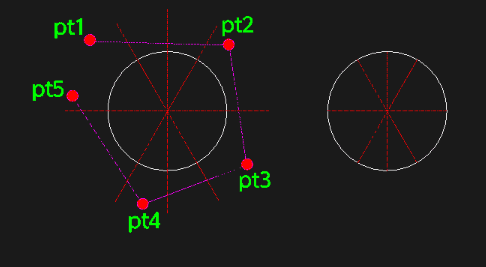
This tool enhances the TRIM command by allowing you to create a multi-point fence selection with simple clicks.
- Flexible Fence
- Unlike the standard 2-point fence, this tool lets you pick as many points as needed (2, 3, 4, etc.) to define the trim path.
- Quick Execution
- Just click your points and press Enter to instantly trim all objects crossed by the fence line.
- Ergonomic Command
- The command alias WWW is designed for quick left-handed entry.
How to use
- 1.Type www in the command line and press Enter.
- 2.Click the First Point of your fence line.
- 3.Click subsequent Points to extend the fence path across the objects you want to trim.
- 4.Press Enter to execute the trim.
Example
Included free
All 401 LISP utilities come free with every Cadopilar license.
Purchase any Cadopilar license and our team will install the complete suite for you. No additional charge, no setup headaches.
Contact us to get started →