LISP Utilities
RECFRECF.ELFDraw Filled Rectangle from Point
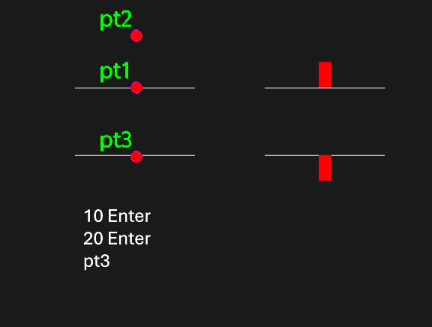
Generates a solid-filled rectangle from a mid-baseline point.
Description
This tool creates a filled rectangle (solid fill) based on a starting point and specified dimensions.
- Point-Based Creation
- Starts drawing from a user-defined base point (e.g., bottom center).
- Dimensional Input
- Requires input for width and height to define the rectangle's size.
- Dual Creation Option
- Allows creating a mirrored or second rectangle on the opposite side by simply picking another point.
How to use
(Optional) Click an Opposite Point to create another filled rectangle on the other side, or press Esc to finish.
- 1.Type recf in the command line and press Enter.
- 2.Click the Start Point (PT1).
- 3.Click a point to define the Direction (PT2).
- 4.Enter the Width value.
- 5.Enter the Height value.
Example
Included free
All 401 LISP utilities come free with every Cadopilar license.
Purchase any Cadopilar license and our team will install the complete suite for you. No additional charge, no setup headaches.
Contact us to get started →