LISP Utilities
TNTN.ELF2-Column Table Creation and Input
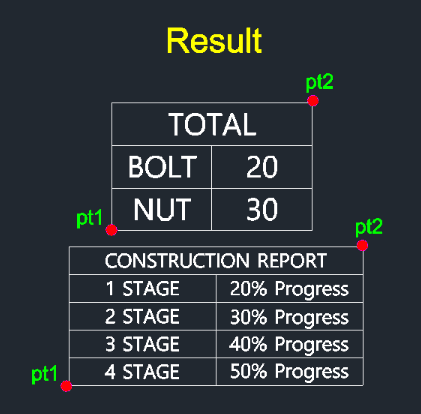
Generates a two-column table with immediate data entry.
Description
This tool creates a simple two-column table and immediately prompts for content entry.
- Instant Creation
- Draws a table outline based on a specified area and row count.
- Streamlined Input
- Automatically cycles through each cell (Header -> Row 1 Left -> Row 1 Right -> Row 2 Left...) prompting for text input, speeding up data entry.
How to use
Continue entering text for each cell as prompted until the table is full
- 1.Type tn in the command line and press Enter.
- 2.Click the First Corner (PT1) of the table area.
- 3.Click the Diagonal Corner (PT2).
- 4.Enter the Number of Rows (total lines including header).
- 5.Enter text for the Header and press Enter.
- 6.Enter text for the Left Cell of the next row and press Enter.
- 7.Enter text for the Right Cell of the same row and press Enter.
Example
Included free
All 401 LISP utilities come free with every Cadopilar license.
Purchase any Cadopilar license and our team will install the complete suite for you. No additional charge, no setup headaches.
Contact us to get started →