Description
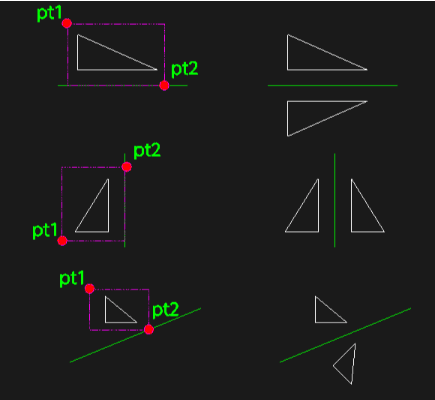
This tool streamlines the mirroring process by combining object selection and axis definition into just two clicks.
- Selection & Axis in One
- The second point of your selection window automatically acts as the point the mirror axis passes through.
- Smart Snap
- The tool automatically snaps to the "Nearest" point on an entity for the second click, ensuring precise alignment.
How to use
The objects are mirrored around the vertical axis at PT2.
- 1.Type mi2p in the command line and press Enter.
- 2.Click the First Corner (PT1) of the selection window.
- 3.Click the Second Corner (PT2) on the line or point you want to use as the mirror axis center.
Example
Included free
All 401 LISP utilities come free with every Cadopilar license.
Purchase any Cadopilar license and our team will install the complete suite for you. No additional charge, no setup headaches.
Contact us to get started →