LISP Utilities
TGLTGL.ELFToggle Text Layer Freeze/Thaw
Toggles the freeze/thaw state of the TEXT layer.
Description
This tool provides a one-step toggle to instantly freeze or thaw all text layers in the drawing.
- Instant Toggle
- Switches the visibility of text objects (specifically the "TEXT" layer) between frozen and thawed states with a single command.
- Cyclic Action
- Repeatedly running the command alternates between hiding and showing the text.
How to use
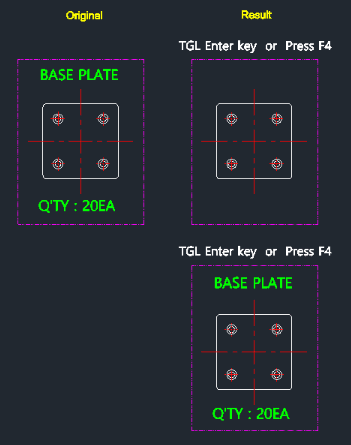
The text layer freezes (disappears).
The text layer thaws (reappears).
- 1.Type tgl in the command line and press Enter.
- 2.Type tgl again.
Example
Included free
All 401 LISP utilities come free with every Cadopilar license.
Purchase any Cadopilar license and our team will install the complete suite for you. No additional charge, no setup headaches.
Contact us to get started →