Description
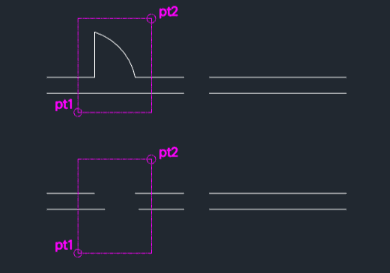
This tool is designed to restore broken wall lines in architectural drawings, typically used when removing inserted objects like door symbols.
- Functionality
- It simultaneously deletes the object (e.g., a door block) situated between two points and reconnects the wall line on its original layer, filling the gap.
- Compatibility
- This is a dedicated Cadopilar Lisp tool and works only within Cadopilar.
How to use
The symbol or object between the points is deleted, and the broken line is automatically restored.
- 1.Type wr in the command line and press Enter.
- 2.Click the First Point (one side of the opening/break).
- 3.Click the Second Point (the other side of the opening/break).
Example
Included free
All 401 LISP utilities come free with every Cadopilar license.
Purchase any Cadopilar license and our team will install the complete suite for you. No additional charge, no setup headaches.
Contact us to get started →