Description
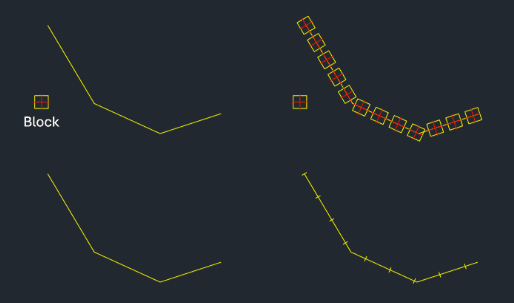
This tool allows you to array blocks along a specified path (Line, Arc, Polyline, Spline) at a fixed interval, similar to the MEASURE command.
- Flexibility
- It supports two modes: using a pre-existing block or creating a simple single-line block on the fly during command execution.
- Compatibility
- This is a dedicated Cadopilar Lisp tool and works only within Cadopilar.
How to use
The blocks are automatically arrayed along the selected path.
- 1.Type ablk in the command line and press Enter.
- 2.Select the Path Object (Line, Arc, Polyline, etc.).
- 3.Choose your method:
- 4.Enter the Distance (Interval) between blocks.
- Method A (Existing Block)
- Enter the Block Name of a pre-existing block.
- Method B (Create On-the-Fly)
- Press Enter, type a name for the new block, click a Start Point, and enter the Height (Length) for the line block.
Example
Included free
All 401 LISP utilities come free with every Cadopilar license.
Purchase any Cadopilar license and our team will install the complete suite for you. No additional charge, no setup headaches.
Contact us to get started →