LISP Utilities
GIDUNGgidung.elfDraw Column (Seq)
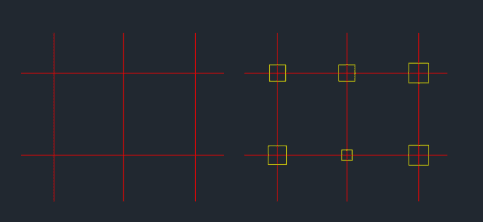
Continuously generates rectangles (columns) centered on specified points.
Description
This tool allows you to continuously draw rectangular columns by specifying their center points.
- Application
- It is particularly useful in architectural drawings for quickly placing column grids.
- Repetition
- You can easily repeat the same column size by pressing Enter, or input new dimensions for different columns on the fly.
- Compatibility
- This is a dedicated Cadopilar Lisp tool and works only within Cadopilar.
How to use
For subsequent columns:
Or, type New Values for width and height if the size changes.
The command repeats infinitely; press Esc to exit when finished.
- 1.Type gidung in the command line and press Enter.
- 2.Click the Center Point where the column will be placed.
- 3.Enter the Width (Horizontal) and Height (Vertical) of the column.
- 4.Click the next Center Point.
- 5.Press Enter to use the same dimensions as the previous one.
Example
Included free
All 401 LISP utilities come free with every Cadopilar license.
Purchase any Cadopilar license and our team will install the complete suite for you. No additional charge, no setup headaches.
Contact us to get started →