LISP Utilities
PADAN2PADAN2.elfDraw Break Line (Double)
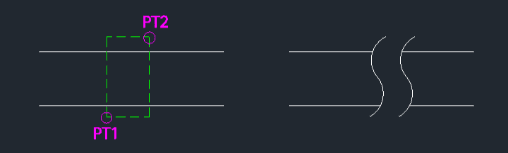
Generates a double spline break line for removed sections.
Description
This tool is the second iteration of the break line (cut line) drawing tool, designed for representing cylindrical objects like pipes.
- Directionality
- It requires specific input order (Bottom-Left to Top-Right) to generate the correct shape.
- Aspect Ratio
- The visual result depends on the ratio of the rectangle defined by the two points; avoiding excessively wide rectangles yields better results.
- Compatibility
- This is a dedicated Cadopilar Lisp tool and works only within Cadopilar.
How to use
The break line symbol is automatically generated within the defined boundary.
- 1.Type padan2 in the command line and press Enter.
- 2.Click the Bottom-Left Corner of the area where the break line will be drawn.
- 3.Click the Top-Right Corner of the area.
Example
Included free
All 401 LISP utilities come free with every Cadopilar license.
Purchase any Cadopilar license and our team will install the complete suite for you. No additional charge, no setup headaches.
Contact us to get started →