Description
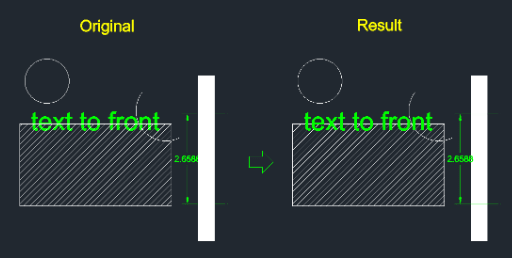
This tool automatically brings all text and dimension objects to the very front of the drawing order.
- Printing Safety
- It ensures that annotations are not hidden behind other objects (like hatches or images) when printing.
- Compatibility
- This is a dedicated Cadopilar Lisp tool and works only within Cadopilar.
How to use
The tool immediately processes the entire drawing, moving all text and dimensions to the front. No further input is required.
- 1.Type tfr in the command line and press Enter.
Example
Included free
All 401 LISP utilities come free with every Cadopilar license.
Purchase any Cadopilar license and our team will install the complete suite for you. No additional charge, no setup headaches.
Contact us to get started →