Description
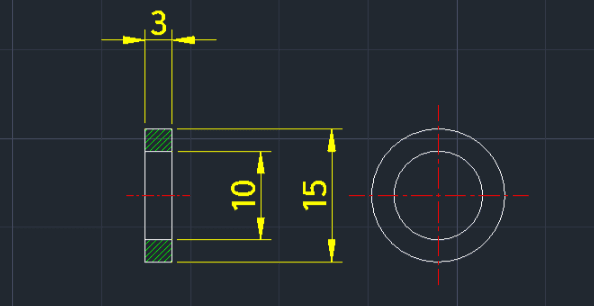
This tool automatically draws a washer, including its hatch pattern and dimensions (with Phi symbol).
- Automation
- Instead of manually drawing circles, hatching, and adding dimensions, this tool completes the entire process in one go based on the input diameters.
- Compatibility
- This is a dedicated Cadopilar Lisp tool and works only within Cadopilar.
How to use
The washer is drawn complete with hatching, dimensions, and diameter symbols.
- 1.Type washer in the command line and press Enter.
- 2.Click the Left Center Line (Reference point).
- 3.Click the Direction where the side view will be drawn (Right Horizontal or Left Horizontal).
- 4.Enter the Inner Diameter (ID) and press Enter.
- 5.Enter the Outer Diameter (OD) and press Enter.
Example
Included free
All 401 LISP utilities come free with every Cadopilar license.
Purchase any Cadopilar license and our team will install the complete suite for you. No additional charge, no setup headaches.
Contact us to get started →