Description
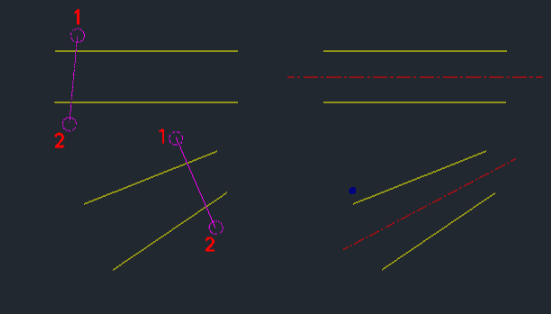
This tool automatically draws a center line between two selected lines.
- Layer Automation
- If a "CENTER" layer does not exist, it creates one automatically and places the center line on it.
- Auto-Scaling
- The linetype scale (celtscale) of the center line is automatically adjusted based on the length of the line, ensuring it always appears as a dashed center line rather than a continuous solid line, even for short segments.
- Compatibility
- This is a dedicated Cadopilar Lisp tool and works only within Cadopilar.
How to use
The center line is instantly drawn between the two selected lines on the CENTER layer.
- 1.Type clm in the command line and press Enter.
- 2.Select Two Lines by clicking or crossing over them (as shown in the blog image/description).
Example
Included free
All 401 LISP utilities come free with every Cadopilar license.
Purchase any Cadopilar license and our team will install the complete suite for you. No additional charge, no setup headaches.
Contact us to get started →