Description
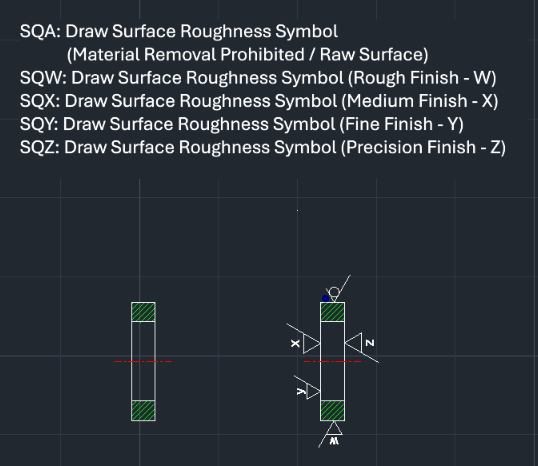
This tool allows you to quickly draw surface roughness symbols (A, W, X, Y, Z) in mechanical drawings.
- Multiple Commands
- Each command corresponds to a specific surface roughness grade (e.g., SQA for grade A, SQW for grade W, etc.).
- Snap Functionality
- The command automatically activates the NEAR OSNAP to help place the symbol directly on an object line.
- Compatibility
- This is a dedicated Cadopilar Lisp tool and works only within Cadopilar.
How to use
The corresponding surface roughness symbol is drawn at the selected location and orientation.
- 1.Type one of the commands (sqa, sqw, sqx, sqy, or sqz) in the command line and press Enter.
- 2.Click the Object Line where you want to place the symbol (Near Osnap is active).
- 3.Click a point to define the Direction (e.g., clicking to the right for a horizontal line usually orients it correctly).
- 4.Enter the Length of One Side of the Triangle (symbol size) and press Enter.
Example
Included free
All 401 LISP utilities come free with every Cadopilar license.
Purchase any Cadopilar license and our team will install the complete suite for you. No additional charge, no setup headaches.
Contact us to get started →