Description
This tool allows you to continuously draw double lines (offsets) on both sides of a central axis by entering diameter values.
- Functionality
- Instead of calculating the radius (half-width) for offsets, you simply input the full diameter. The tool automatically calculates the half-width and draws lines on both sides of the center points you defined.
- Continuous Input
- You can enter multiple diameter values in sequence to draw concentric/parallel sets of lines without restarting the command.
- Compatibility
- This is a dedicated Cadopilar Lisp tool and works only within Cadopilar.
How to use
- 1.Type 2l in the command line and press Enter.
- 2.Click the Center Point (Start of the axis).
- 3.Click the Opposite Center Point (End of the axis).
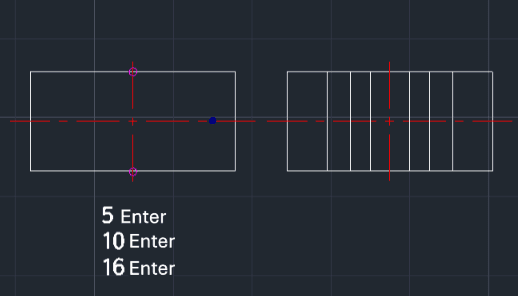
- 4.Enter a Diameter Value (e.g., 5) and press Enter. (Draws lines offset by 2.5 on each side).
- 5.Enter another Diameter Value (e.g., 10) and press Enter. (Draws lines offset by 5 on each side).
- 6.Enter more values as needed (e.g., 16...).
- 7.Press Esc to finish the command.
Example
Included free
All 401 LISP utilities come free with every Cadopilar license.
Purchase any Cadopilar license and our team will install the complete suite for you. No additional charge, no setup headaches.
Contact us to get started →