Description
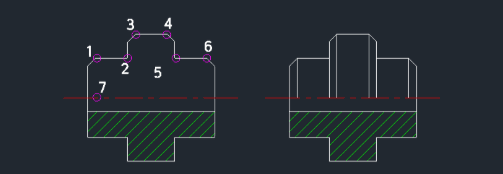
This tool allows you to draw multiple vertical lines simultaneously descending from selected points to a target horizontal line.
- Batch Drawing
- It simulates "rain" by dropping vertical lines from multiple specified points down to a single horizontal reference line in one action.
- Limitation
- This tool is designed specifically for vertical lines and supports a maximum of 8 points per execution.
- Compatibility
- This is a dedicated Cadopilar Lisp tool and works only within Cadopilar.
How to use
Finally, click the Horizontal Reference Line (the target line where the vertical lines will end).
All vertical lines are drawn at once from the selected points to the horizontal line.
- 1.Type rain in the command line and press Enter.
- 2.Enter the Number of Points (lines) you want to draw (up to 8).
- 3.Click the Start Points (e.g., points 1, 2, 3...) from where the vertical lines will originate.
Example
Included free
All 401 LISP utilities come free with every Cadopilar license.
Purchase any Cadopilar license and our team will install the complete suite for you. No additional charge, no setup headaches.
Contact us to get started →