Description
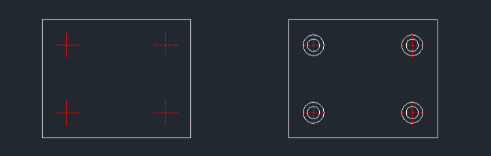
This tool allows you to continuously draw a counterbore plan view (consisting of two concentric circles) at multiple insertion points.
- Continuous Drawing
- Once the diameters are set, you can place the same counterbore symbol at multiple locations simply by clicking, without re-entering the dimensions.
- Compatibility
- This is a dedicated Cadopilar Lisp tool and works only within Cadopilar.
How to use
- 1.Type cbp in the command line and press Enter.
- 2.Enter the Diameter of the Small Circle.
- 3.Enter the Diameter of the Large Circle.
- 4.Click the Insertion Points where you want to place the circles. You can continue clicking multiple points to draw them consecutively.
- 5.Press Esc to finish the command.
Example
Included free
All 401 LISP utilities come free with every Cadopilar license.
Purchase any Cadopilar license and our team will install the complete suite for you. No additional charge, no setup headaches.
Contact us to get started →