LISP Utilities
SECLANTSECL.elfDraw Section Line / Section Callout
Draws a section viewing arrow with an associated text label.
Description
This toolset consists of two commands to create section lines and section indicators (arrows and text).
- SECL (Section Line)
- Draws the section line path. It supports creating complex section lines with up to 7 steps/segments. The thickness of the heavy line segments can be adjusted (default is 0.3mm).
- ANT (Arrow N Text)
- Adds the section view arrows and text labels to the ends of the section line drawn by SECL.
- Compatibility
- This is a dedicated Cadopilar Lisp tool and works only within Cadopilar.
How to use
For Section Lines (SECL):
For Arrows and Text (ANT):
- 1.Type secl in the command line and press Enter.
- 2.Enter the Line Thickness (press Enter for the default 0.3mm).
- 3.Click points to define the section line path (up to 7 steps).
- 4.Press Esc to finish drawing the line.
- 5.Type ant in the command line and press Enter.
- 6.Click the First Point (AN1) at one end of the section line.
- 7.Enter the Section Text (e.g., A).
- 8.Click the Second Point (ANT2) at the other end of the section line to place the second arrow and text.
Example
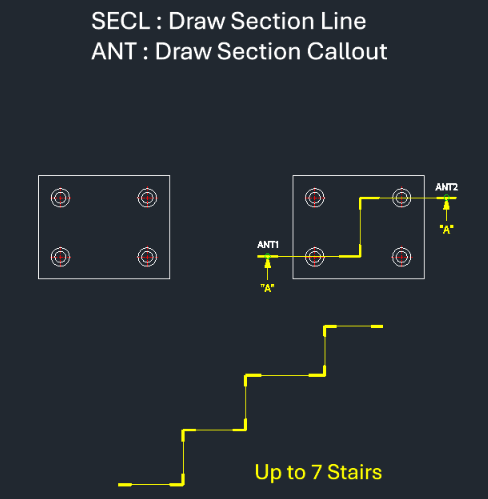
Included free
All 401 LISP utilities come free with every Cadopilar license.
Purchase any Cadopilar license and our team will install the complete suite for you. No additional charge, no setup headaches.
Contact us to get started →