LISP Utilities
VLTVLT.elfAnnotate Horizontal Wire Thickness
Sets the width of horizontal wires for schematics.
Description
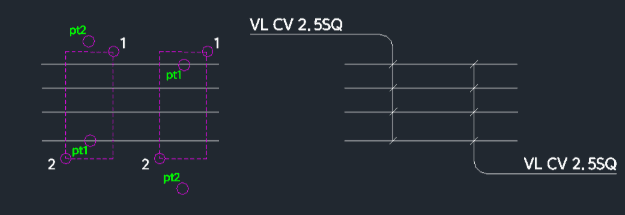
This tool is designed for sequence drawings to specify the thickness of horizontal wires in a vertical direction.
- Functionality
- This is the counterpart to the previously released "HLT" command (which handles vertical wires horizontally). It helps in annotating wire thickness across horizontal lines using a crossing selection method.
- Compatibility
- This is a dedicated Cadopilar Lisp tool and works only within Cadopilar.
How to use
- 1.Type vlt in the command line and press Enter.
- 2.Select the Horizontal Wires (Lines) using a Crossing Selection (click Point 1 then Point 2 across the wires) and press Enter.
- 3.Click Pt1 (First point for the label/annotation).
- 4.Click Pt2 (Second point for the label/annotation).
- 5.Enter the Wire Thickness Content (text to display) and press Enter.
- 6.Press Enter one more time to finish the command.
- Initial Setup
- If prompted (first run), enter the Electrical Symbol Insertion Scale.
Example
Included free
All 401 LISP utilities come free with every Cadopilar license.
Purchase any Cadopilar license and our team will install the complete suite for you. No additional charge, no setup headaches.
Contact us to get started →