Description
This tool automates the process of cutting or grooving the inner section of a shaft.
- Version Compatibility
- It works on all versions of Cadopilar. It automatically detects the version and adjusts the internal trim routines accordingly.
- Functionality
- It simplifies creating internal cuts/grooves by defining reference points and dimensions (width and height of the cut).
How to use
The shaft inner section is modified according to the inputs.
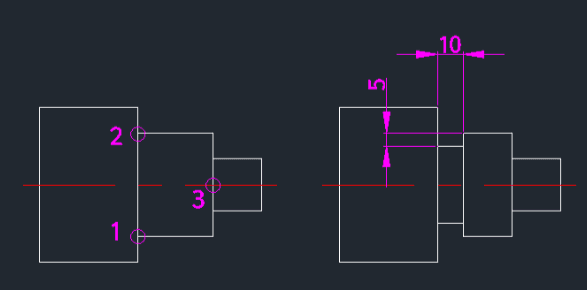
- 1.Type scut in the command line and press Enter.
- 2.Select Point 1 (Reference point on the shaft).
- 3.Select Point 2 (Another reference point).
- 4.Select Point 3 (Position for the cut).
- 5.Enter the Horizontal Length (Width) of the cut to be made.
- 6.Enter the Vertical Height (Depth/Height) of the cut.
Example
Included free
All 401 LISP utilities come free with every Cadopilar license.
Purchase any Cadopilar license and our team will install the complete suite for you. No additional charge, no setup headaches.
Contact us to get started →