LISP Utilities
1DJ1DJ.elfDirectional Straight Terminal
Inserts a blade terminal at line endpoints for schematics.
Description
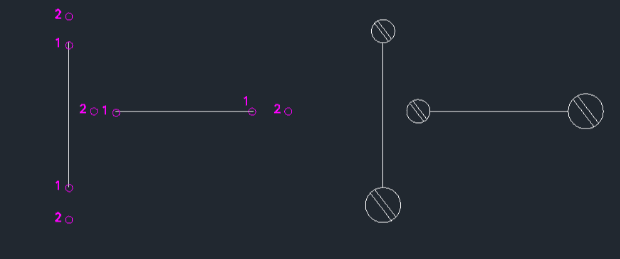
This tool allows you to insert a straight ("1-shape") terminal symbol at the end of a line in sequence drawings.
- Functionality
- It places a terminal symbol at a specified endpoint of a line, aligning it according to the selected direction.
- Scale Control
- On the first run, you set the insertion scale. For subsequent uses, it remembers this value. You can change the scale anytime using the FAC command.
- Compatibility
- This is a dedicated Cadopilar Lisp tool and works only within Cadopilar.
How to use
The straight terminal symbol is inserted at the selected endpoint.
- 1.Type 1dj in the command line and press Enter.
- 2.Click the Endpoint of the line where you want to insert the terminal.
- 3.Click a point to define the Direction for the terminal.
- Initial Setup (First Run)
- If prompted, enter the Electrical Symbol Insertion Scale.
Note
- To change the symbol scale later, use the FAC command.
Example
Included free
All 401 LISP utilities come free with every Cadopilar license.
Purchase any Cadopilar license and our team will install the complete suite for you. No additional charge, no setup headaches.
Contact us to get started →