LISP Utilities
ROOTROOT.elfDraw Radical Denominator
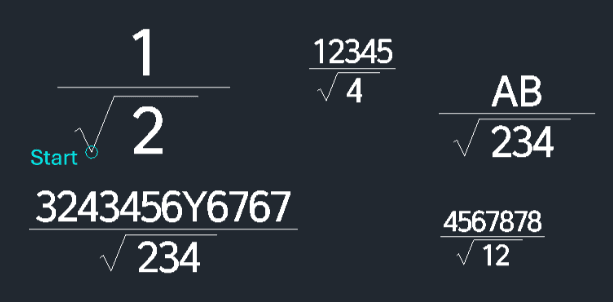
Generates a fraction with a square root denominator.
Description
This tool allows you to create a mathematical formula where a square root appears in the denominator of a fraction.
- Dynamic Formatting
- The length of the horizontal fraction bar automatically adjusts based on the length of the text input.
- Text Size Control
- The size of the text is determined by the DIMTXT or DIMSCALE variables. You should adjust these variables before running the command if you need a specific text size.
- Compatibility
- This is a dedicated Cadopilar Lisp tool and works only within Cadopilar.
How to use
The complete formula is generated with the square root symbol in the denominator and the fraction bar correctly sized.
- 1.Type root in the command line and press Enter.
- 2.Click the Start Point where the formula will be placed.
- 3.Enter the Value inside the Square Root (Denominator).
- 4.Enter the Value for the Numerator (Top part of the fraction).
- Adjust Text Size (Optional)
- Change the DIMTXT or DIMSCALE variable to set the desired text size.
Example
Included free
All 401 LISP utilities come free with every Cadopilar license.
Purchase any Cadopilar license and our team will install the complete suite for you. No additional charge, no setup headaches.
Contact us to get started →