Description
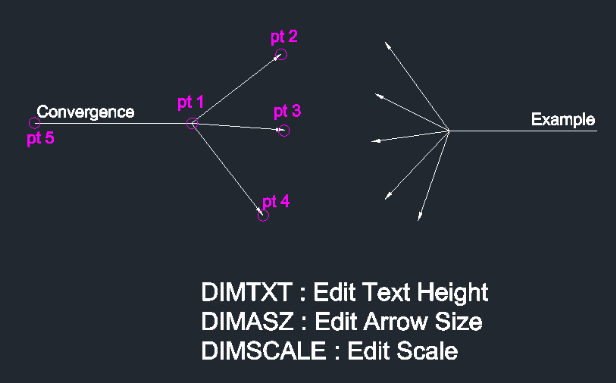
This tool allows you to draw multiple arrows originating from different points, converging to a single leader line with text annotation.
- Efficiency
- Instead of manually drawing individual leaders and editing them to merge, this tool automates the creation of a "many-to-one" leader style, commonly used to indicate multiple items sharing the same description.
- Compatibility
- This is a dedicated Cadopilar Lisp tool and works only within Cadopilar.
How to use
- 1.Type mar in the command line and press Enter.
- 2.Click the First Point (start of the first arrow).
- 3.Click subsequent Points (starts of additional arrows) as needed.
- 4.Press Enter when you are done selecting arrow start points.
- 5.Click the Convergence Point (where the leader line ends/underlines text - ensure this is a horizontal click).
- 6.Enter the Text Content.
- 7.Press Enter twice to finish the command.
Example
Included free
All 401 LISP utilities come free with every Cadopilar license.
Purchase any Cadopilar license and our team will install the complete suite for you. No additional charge, no setup headaches.
Contact us to get started →