LISP Utilities
URECUREC.elfDraw Off-Center Rect Cutout
Generates an eccentric rectangle and trims internal geometry.
Description
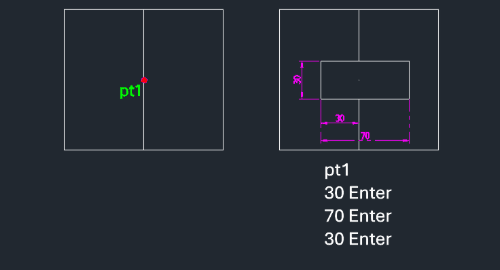
This tool draws a rectangle where the reference point (PT1) is not at the geometric center or corner, but offset by a specific distance from the left edge. It also trims or cleans up entities inside the newly created rectangle.
- Offset Center
- You define the rectangle by a base point (PT1) and specifying how far the left edge is from that point.
- Auto-Trim
- Automatically removes objects located inside the generated rectangle boundary.
- Input
- Requires a base point (PT1), the distance from PT1 to the left edge, the total width, and the total height.
How to use
An off-center rectangle is drawn based on your inputs, and internal objects are erased.
- 1.Type urec in the command line and press Enter.
- 2.Click the Base Point (PT1).
- 3.Enter the Left Offset Distance (distance from PT1 to the left edge of the rectangle, e.g., 30).
- 4.Enter the Total Width of the rectangle (e.g., 70).
- 5.Enter the Total Height of the rectangle (e.g., 30).
Example
Included free
All 401 LISP utilities come free with every Cadopilar license.
Purchase any Cadopilar license and our team will install the complete suite for you. No additional charge, no setup headaches.
Contact us to get started →