Description
This tool allows you to automatically insert the same text string into multiple selected table cells.
- Batch Insertion
- Select multiple cells at once and populate them with the same text.
- Centering
- The text is automatically placed in the center of each selected cell.
- Input
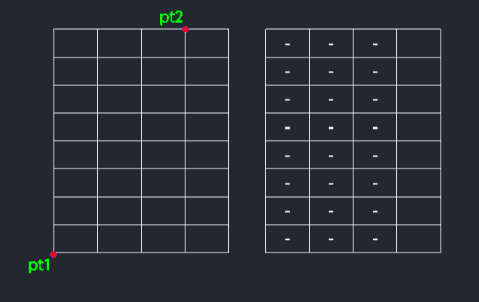
- Requires the text string, and two points (diagonal corners) to define the selection area containing the cells.
How to use
The specified text is inserted into the center of all selected cells.
- 1.Type atext in the command line and press Enter.
- 2.Type the Desired Text and press Enter.
- 3.Click the First Corner (PT1) of the selection area.
- 4.Click the Diagonal Corner (PT2) to encompass the target cells.
Example
Included free
All 401 LISP utilities come free with every Cadopilar license.
Purchase any Cadopilar license and our team will install the complete suite for you. No additional charge, no setup headaches.
Contact us to get started →