Description
This tool automates the process of numbering cells in a table by placing a number inside a circle.
- Auto-Numbering
- Similar to the ANO command, but encloses each number in a circle.
- Flexible Selection
- Works regardless of the selection order of the cell boundaries.
- Options
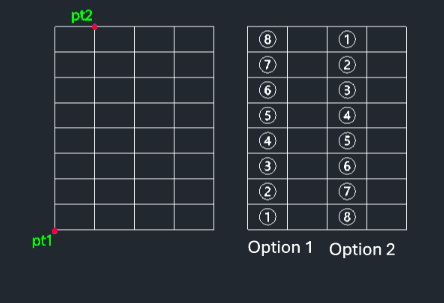
- Offers choices for numbering direction (likely horizontal or vertical, though specified as "Option 1" or "Option 2").
- Input
- Requires two diagonal points to define the cell area and selecting a numbering option.
How to use
A circled number is automatically placed within the defined cell.
- 1.Type anoc in the command line and press Enter.
- 2.Click the First Corner (PT1) of the cell.
- 3.Click the Diagonal Corner (PT2) of the cell.
- 4.Choose the Numbering Option (1 or 2).
Example
Included free
All 401 LISP utilities come free with every Cadopilar license.
Purchase any Cadopilar license and our team will install the complete suite for you. No additional charge, no setup headaches.
Contact us to get started →