LISP Utilities
GCOLORGLAYERGCOLOR.elfSelect Similar Object by Color / Layer
Selects similar objects by color / Selects similar objects by layer.
Description
This tool allows you to select all objects within a specified area that share the same color or layer as a reference object.
- GCOLOR
- Selects objects with the same color as the source object (blocks are excluded).
- GLAYER
- Selects objects on the same layer as the source object (blocks are excluded).
- Selection Method
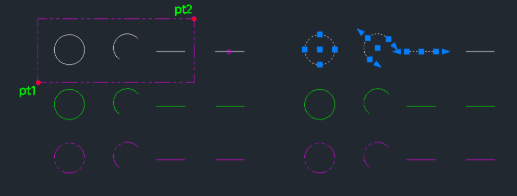
- Works by picking a source object to define the property (color or layer) and then defining a window area to search.
How to use
To select by Color:
All matching colored objects in that area are selected.
To select by Layer:
All matching layered objects in that area are selected.
- 1.Type gcolor in the command line and press Enter.
- 2.Click the Source Object whose color you want to match.
- 3.Click PT1 and PT2 to define the selection window.
- 4.Type glayer in the command line and press Enter.
- 5.Click the Source Object whose layer you want to match.
- 6.Click PT1 and PT2 to define the selection window.
Example
Included free
All 401 LISP utilities come free with every Cadopilar license.
Purchase any Cadopilar license and our team will install the complete suite for you. No additional charge, no setup headaches.
Contact us to get started →