LISP Utilities
TPINTPIN.elfCopy to All Intersections
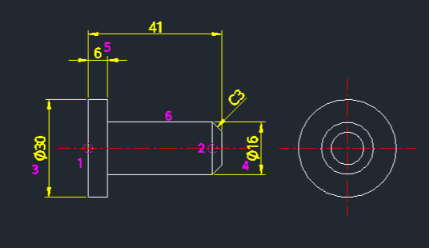
Generates the front view, side view and dimensions of a T-pin.
Description
This tool automatically draws the front view and side view of a T-shaped pin, including dimensions, in a single operation.
- Automation
- Generates the complete pin geometry (head and shaft) along with corresponding views and dimensions based on user inputs.
- Inputs
- Requires specifying diameters for the head and shaft, lengths for both sections, and precision for the diameter symbols.
How to use
- 1.Type tpin in the command line and press Enter.
- 2.Click the Insertion Point (Position 1).
- 3.Click the Direction (Position 2).
- 4.Enter the Large Diameter (Head).
- 5.Enter the Small Diameter (Shaft).
- 6.Enter the First Length.
- 7.Enter the Second Length.
- 8.Enter the Decimal Places (for Phi dimension symbol precision).
Example
Included free
All 401 LISP utilities come free with every Cadopilar license.
Purchase any Cadopilar license and our team will install the complete suite for you. No additional charge, no setup headaches.
Contact us to get started →