Description
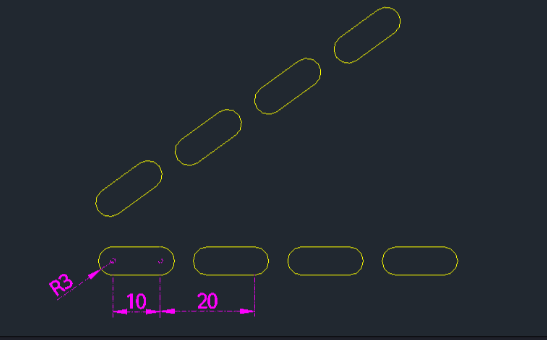
This tool draws a slot shape and simultaneously creates a linear array of it in a specified direction.
- Automation
- Combines the drawing of a slot and the array command into a single workflow.
- Future Update
- The author mentions a future update will include the ability to automatically draw centerlines for the slots.
How to use
- 1.Type slar in the command line and press Enter.
- 2.Click the Left Center Point of the first slot.
- 3.Click the Direction where the slot (and array) will be drawn.
- 4.Enter the Distance Between Centers (Slot Length).
- 5.Enter the Pitch Distance (Distance between array items).
- 6.Enter the Total Quantity of slots.
Example
Included free
All 401 LISP utilities come free with every Cadopilar license.
Purchase any Cadopilar license and our team will install the complete suite for you. No additional charge, no setup headaches.
Contact us to get started →