Description
This tool converts a selected numeric text string into "pyeong" (a traditional Korean unit of area) and places the result at a specified location.
- Unit Conversion
- It reads the number from the selected text, calculates the equivalent value in pyeong (likely based on square meters, though the exact conversion factor isn't explicitly stated in the summary, 1 m² approx 0.3025 pyeong), and creates a new text object.
- Formatting
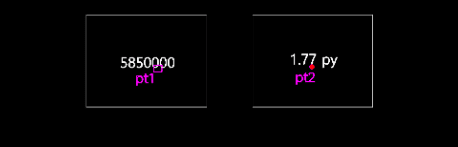
- The output text includes the converted value followed by "py" (e.g., "1.77 py"). The new text adopts the existing text's size.
- Input
- Requires selecting a text object containing a number and clicking a point for the new text's position.
How to use
The new text showing the pyeong value is created.
- 1.Type topy in the command line and press Enter.
- 2.Select the Numeric Text you want to convert.
- 3.Click the Insertion Point where the converted "py" text should appear.
Example
Included free
All 401 LISP utilities come free with every Cadopilar license.
Purchase any Cadopilar license and our team will install the complete suite for you. No additional charge, no setup headaches.
Contact us to get started →