Description
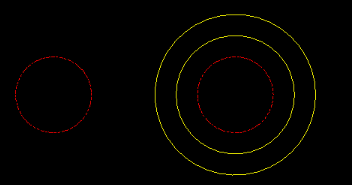
This tool offsets an object and places the new offset object directly onto the current active layer, rather than the source object's layer.
- Layer Management
- Simplifies the process when you want offset geometry to immediately take on the properties of the current working layer (e.g., offsetting a wall line to create a centerline).
- Efficiency
- Combines the offset operation and layer change into one step.
How to use
Set the desired Current Layer.
The new object is created on the current layer.
- 1.Type ofc in the command line and press Enter.
- 2.Enter the Offset Distance.
- 3.Select the Object to Offset.
- 4.Click the Direction/Side for the offset.
Example
Included free
All 401 LISP utilities come free with every Cadopilar license.
Purchase any Cadopilar license and our team will install the complete suite for you. No additional charge, no setup headaches.
Contact us to get started →