Description
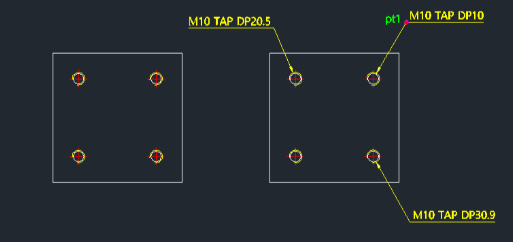
This tool simplifies the process of creating dimension leaders for tapped holes (threaded holes).
- Automated Detailing
- Generates a standard leader and text for tap specifications without manual drafting.
- Input
- Requires selecting the outer arc of the tapped hole (the representation of the thread), picking a leader landing point (PT1), and entering the depth.
- Flexibility
- Works in all 4 quadrants. Arrow and text sizes are controlled by dimscale, dimtxt, and dimasz.
How to use
The tap dimension leader is automatically drawn.
- 1.Type taplea in the command line and press Enter.
- 2.Select the Outer Arc of the tapped hole.
- 3.Click the Leader Landing Point (PT1).
- 4.Enter the Depth Value.
Example
Included free
All 401 LISP utilities come free with every Cadopilar license.
Purchase any Cadopilar license and our team will install the complete suite for you. No additional charge, no setup headaches.
Contact us to get started →