LISP Utilities
4CRV4CRV.elfDraw 4 Top/Bot Circles Outside Rectangle
Generates four circles vertically around a rectangle.
Description
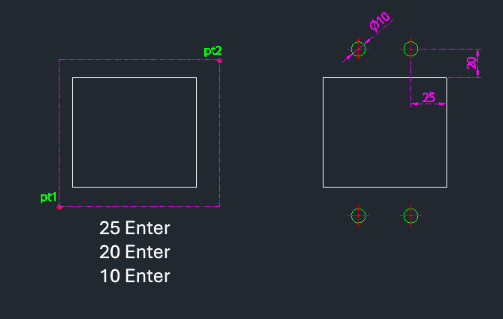
This tool draws four circles symmetrically positioned inside a rectangle, specifically offset vertically and horizontally from the corners.
- Symmetrical Layout
- Creates circles at four corners relative to the rectangle's bounds.
- Input
- Requires defining the rectangle (two points), the horizontal offset from the corner to the circle center, the vertical offset, and the circle diameter.
- Auto-Layer
- Automatically creates necessary layers if they don't exist.
How to use
Four circles (with center lines) are drawn inside the rectangle at the specified positions.
- 1.Type 4crv in the command line and press Enter.
- 2.Click the First Corner Point (PT1) of the rectangle.
- 3.Click the Second Corner Point (PT2).
- 4.Enter the Horizontal Offset from the corner to the circle center.
- 5.Enter the Vertical Offset from the corner to the circle center.
- 6.Enter the Circle Diameter.
Example
Included free
All 401 LISP utilities come free with every Cadopilar license.
Purchase any Cadopilar license and our team will install the complete suite for you. No additional charge, no setup headaches.
Contact us to get started →