Description
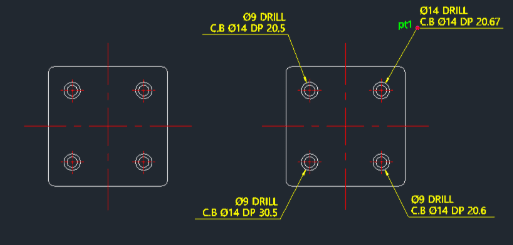
This tool streamlines the process of adding dimension leaders for counterbore holes.
- Automated Detailing
- Instead of manually drawing leaders and typing out the counterbore symbol and dimensions, this tool generates them automatically based on the selected geometry.
- Input
- Requires selecting the inner (small) circle, the outer (large) circle, a point for the leader landing (PT1), and the depth value.
- Flexibility
- It works in all 4 quadrants/directions. The size of arrows and text is controlled by your current dimscale, dimtxt, and dimasz settings.
How to use
The counterbore dimension leader is drawn with the appropriate symbols and values.
- 1.Type cblea in the command line and press Enter.
- 2.Select the Small Circle.
- 3.Select the Large Circle.
- 4.Click the Leader Landing Point (PT1).
- 5.Enter the Depth Value.
Example
Included free
All 401 LISP utilities come free with every Cadopilar license.
Purchase any Cadopilar license and our team will install the complete suite for you. No additional charge, no setup headaches.
Contact us to get started →